 mommysgoodpuppy
45c304f65d
mommysgoodpuppy
45c304f65d
Pin the helper with access-scoped PipeWire connections and safe BGRA packing.
Add helper-only capture session overrides and a reproducible isolated KWin/KDE
portal test through PetPlay's real receiver. Document passing native Linux
capture checks and the remaining physical Frame validation.

Run capture buffer tests on both Linux CI architectures and attach the bundled
ARM64 executable to releases with desktop executables and SHA256 checksums.

Agent: Codex 0.163.0; model gpt-6.1-sol; thread 01a145fa-213b-7510-83c0-48dd3e275c9a
A modular overlay augmented reality system
Join the discord! https://discord.gg/Ms24sS9kEa
How the pieces fit together — process topology, every actor and its messages, the scene/render split, and the supervision state machine — is in docs/ARCHITECTURE.md. The Steam Frame investigation records the ARM64 image, QEMU results, and remaining hardware checks.
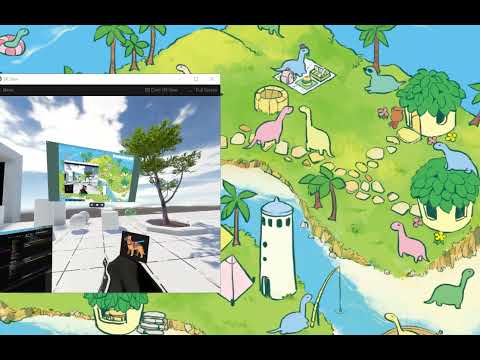
YouTube demo
Reqs: Npm, Deno, SteamVR, Windows or Linux, optionally vscode. Building releases also needs Rust and the native capture build dependencies described below.
Clone: git clone -v --recurse-submodules --progress "https://github.com/goodpuppies/petplay.git"
The capture helper source is in submodules/screen-streamer; classes/ScreenCapturer/ is
PetPlay's canonical TypeScript client. Release builds compile this helper from source and embed the matching native executable.
Setup:
deno run preconfdeno install
Usage:
deno run dev
Building a release binary
deno run -A utils/preconf.ts
deno install --allow-import
deno task build:native   # source/dev capture helper; requires Rust
deno task build          # builds WebXR and the capture helper, then compiles into dist/
utils/build.ts wraps deno compile and branches only where Deno itself does not: --icon is
Windows-only (it is rejected outright on Linux), and dist/ keeps the output clear of the
petplay/ source directory on the OSes where the binary carries no extension. The compiled
launcher boots straight into dev, so runtime flags still apply — ./dist/petplay --novr,
./dist/petplay --novr --desktop, and so on. It is compiled with --env-file, so run it from a
directory with the .env it should use.
Release builds require Node.js 20+ and pnpm 10.33.4 for the pinned WebXR runtime, plus Rust for the capture helper. These tools are only needed when building from source.
On Linux, native capture builds require pkg-config, Clang, PipeWire development headers and
D-Bus development headers (Ubuntu: libpipewire-0.3-dev libdbus-1-dev). Windows builds use the
Rust MSVC toolchain and Windows SDK. Development checkouts run deno task build:native once
before using desktop capture; release builds do this automatically.
For a Steam Frame ARM64 build, run deno task build --target=aarch64-unknown-linux-gnu to create
dist/petplay-aarch64. This cross build leaves the developer machine's .env out; supply runtime
settings on the headset. ARM64 builds require Zig 0.13.0 (PETPLAY_ZIG can select the binary);
local cross builds also need PETPLAY_RAYLIB_SYSROOT pointing to target GLFW development
libraries. Native ARM64 CI builds a test-only GLFW 3.4 fixture. See the
raylib build recipe. The native helper builds and remaining hardware checks are in
docs/STEAM_FRAME.md.
CI checks types, runs unit tests and a software-OpenGL smoke playtest, and builds Windows x64, Linux x64 and experimental Linux ARM64 artifacts. The ARM64 executable embeds its source-built capture helper and raylib 5.5 (built with pinned Zig and external GLFW). It requires the Frame runtime’s GLFW/OpenGL/OpenVR libraries. Normal version-tag releases contain desktop builds only while device validation continues. See the Frame testing runbook for Quest/DroidFrame testing and known limits. Default Steam Frame controller bindings are included, alongside Oculus Touch and the separate DroidFrame engineering profile.
Child processes work the same as from a checkout: a compiled build has no Deno CLI to run a module
with, so it re-execs its own binary and imports the child module out of its embedded snapshot
(classes/childModule.ts), keeping the desktop control surface, the decoupled view and the display
overlay host identical in both forms.
Linux / SteamVR
PetPlay discovers the native OpenVR library from /usr/lib or SteamVR and uses the bundled raylib
5.5 shared library. Both paths can be overridden when needed:
PETPLAY_OPENVR_LIBRARY=/path/to/libopenvr_api.so \
PETPLAY_RAYLIB_LIBRARY=/path/to/libraylib.so \
deno task dev
Nested WebXR dependencies require their generated checkout artifacts once after cloning:
deno task build:webxr
(cd submodules/threewebxrwebgpudeno/submodules/uikit && pnpm install --filter @pmndrs/uikit... --ignore-scripts && pnpm --filter @pmndrs/uikit generate)
With SteamVR running, deno task openvr:probe is a lightweight native runtime check.
deno task dev starts the full RayThree/WebXR raylib overlay path.
For desktop-only development without SteamVR, run deno task dev:desktop. This starts the Raylib
desktop-control window, WebXR scene, wrist menu, VRC camera OSC receiver, and agent REPL. Desktop
capture/display presentation is currently disabled in this mode because it is still backed by an
OpenVR overlay.
Dev install: follow SteamVR (Linux)
deno task install:dev installs the checkout as a systemd user service
(~/.config/systemd/user/petplay-dev.service) running utils/steamvr-watch.ts: PetPlay starts when
SteamVR starts and stops when SteamVR goes away, with no terminal attached. deno task dev:steamvr
runs the same watcher in the foreground.
deno task install:dev                 # server follows SteamVR
deno task install:dev -- --desktop    # ... and brings up the desktop control surface
deno task dev:steamvr -- --desktop    # the same watcher, foreground, this shell only
deno task dev:status                  # unit path, state, and the command it runs
deno task uninstall:dev               # stop, disable and delete it
Presence is a process watch, not an OpenVR probe. The watcher looks for the runtime's own
process (vrserver; --steamvr-process=<name>[,<name>] overrides it), because
VR_IsRuntimeInstalled stays true for an installed-but-not-running SteamVR, and a probe would keep
a server alive forever polling a runtime that is not there. Servers started by this watcher also use
attach-only OpenVR initialization: after the observed vrserver exits, PetPlay cannot relaunch
SteamVR and waits for a new manually started runtime process instead. Arguments the watcher does not
recognise go to the server, so --novr, --desktop, --keyboard-locale=fi and
--agent-repl-port=<n> all work as they do with deno task server.
A server already answering on the REPL port is left alone: the watcher adopts nothing and stops only
what it started, so a hand-started deno task server is never killed by SteamVR quitting. Server
flags are baked into the unit at install time, so changing them means re-installing; environment
knobs (PETPLAY_AGENT_REPL_PORT, PETPLAY_KEYBOARD_LOCALE, …) belong in the checkout's .env,
which both the watcher and the server load. The unit is ordered after graphical-session.target —
SteamVR and the desktop surfaces need the session's WAYLAND_DISPLAY/XDG_RUNTIME_DIR —
journalctl --user -u petplay-dev.service -f has the launcher, and the server's own log stays in
logs/ as usual.
On KDE Wayland, select Full Workspace in the initial ScreenCast portal dialog. PetPlay requests
persistent capture access and stores the rotating, single-use restore token under
$XDG_CONFIG_HOME/petplay (normally ~/.config/petplay), so later launches restore the workspace
without prompting unless access was revoked or the workspace configuration is no longer valid.
Keyboard and pointer injection use /dev/uinput and therefore do not require a remote-control
portal dialog. The capture helper starts with the display actor and remains alive independently of
virtual display creation or visibility. Future virtual display units are crop views into this one
workspace stream rather than separate portal captures.
Stageforge networking and its Iroh worker wrapper are disabled by default, so local actors use
native Deno workers. To connect to the Stageforge signaling server, use deno task dev:network,
pass --stageforge-networking to a launch, or set PETPLAY_STAGEFORGE_NETWORKING=1.
Server and clients
A server is a long-lived PetPlay process that owns the scene, the XR frame loop and SteamVR supervision. Shell commands are clients of it: they message the server's agent REPL rather than starting their own scene, so the desktop view is an actor the server starts, not a second process rendering its own copy of the world.
deno task server             # long-lived: scene + supervision + agent REPL on 3987
deno task status             # supervisor / scene / desktop view readout
deno task reboot             # stop the server, start it again with the same arguments
deno task desktop            # decoupled view: a window rendering the server's scene IR
deno task desktop -- --control   # interactive surface: its own scene, can grab (legacy path)
deno task desktop -- --stop      # tear the selected view down
deno task client capture -- --path=shot.png   # PNG of the scene, no window left running
deno task client detach-vr   # ordered SteamVR detach; the supervisor reattaches when it is back
deno task dev                # start a server if none is running, then start the desktop view
The decoupled view is an actor of the server (petplay/desktopView.ts), not a client scene: the
server extracts the scene to raythree IR and ships each frame to the view
(REGISTERWEBXRVIEW → WEBXRVIEWFRAME → ack), which rasterizes it with the same
WebXRRaythreeRaylibRenderer the OpenVR overlay uses. A VR session and one or more desktop windows
therefore show the same scene simultaneously at independent render rates, with a single scene update
between them.
The preview takes no viewpoint input. It used to forward window drag/wheel into
SETDESKTOPVIEWOFFSET, which moves the rendered XR pose only — the OpenVR overlays (the display
mirrors, placed in absolute tracking space by displayOverlayHost) stayed where they were, so the
two coordinate frames drifted apart. Moving the shared viewpoint now needs both the legacy
interactive surface (--control) and the scene's grant (desktopViewControlAllowed); everything
else is refused and leaves the offset at zero.
client capture is the same render and capture path with nothing left behind: with a preview running
it asks that view for a PNG (REQUESTCAPTURE); with none running it starts a hidden one for a
single frame (STARTDESKTOPVIEW { capturePath, hidden, width, height }, which waits for a payload
that actually carries geometry), writes the PNG through the shared screen-capture module and closes
the window. No preview has to be running, and none is left running. --width=/--height= set that
one frame's size — larger than the default 1280×720 is how you read fine UI text.
deno task app is the previous foreground launcher (log mirroring, signal forwarding) for when you
want the server in your terminal; dev:novr and dev:desktop still boot the --novr app directly.
petplay/client.ts resolves the control port exactly like the server does
(--agent-repl-port=<n>, then PETPLAY_AGENT_REPL_PORT, then 3987), so a client can be pointed at
a server elsewhere on loopback.
deno task reboot is the restart path that does not need the terminal that started the server. It
asks main for an ordered DETACHOPENVR while the old process is still alive, finds that process
through /proc (the utils/dev-runner.ts launcher when there is one, so one SIGTERM becomes a
cooperative shutdown), waits for that process to actually exit, starts a fresh server with the same
launch arguments (so --novr, --webxr-raythree-debug=1, locale overrides and the like survive),
then brings back whichever desktop surface was running. --no-detach skips the VR detach. Actor-level
POST /reload remains the cheaper option when only an actor's code changed.
--watch-webxr does that reload for you: the server watches every local file the webxr actor
loads (its deno info graph) and reloads the actor about 300 ms after a save. A save that does not
parse, or imports a file that does not exist, is not reloaded. The old actor keeps running, and a
headset toast names the file, because a worker that fails to load would leave no webxr at all.
A SteamVR-launched server only gets the flag if it was registered with it
(deno task steamvr:register -- --watch-webxr).
Self-healing presentation
The XR image can stop being drawn without any error surfacing — the pump keeps uploading into a
texture SteamVR no longer imports, or the compositor stops drawing an overlay we still call
present() on. webxr watches what SteamVR actually draws while an overlay is configured:
- an overlay the compositor reports invisible for 2 s is re-shown, and its handle is rebuilt if showing does not stick;
- no presented frame for 2.5 s restarts the rendering stack inside the actor (stop, then re-post
the last
STARTWEBXR) — up to 5 times, no process restart and no user action; - a failed overlay frame is no longer fatal: the handle is dropped, the XR tick keeps running, and the retry backs off (retrying at frame rate recreates the overlay dozens of times a second, which corrupted native state);
- rebuilding the raylib render targets drops the overlay handle too, so SteamVR re-imports the new texture instead of drawing a freed one.
Every repair is counted and readable: deno task status shows
presentation=ok repairs=1+0restarts (last: overlay invisible to the compositor), and
deno task client repair (add --restart for the full stack) forces the same path by hand.
Overlay keys are claimed per host process (petplay.webxr.overlay.raylib.<pid>): two running
instances no longer fight over one SteamVR overlay, and a session that died without cleanup leaves
its key in tmp/webxr-overlay-claims.json so the next instance destroys that ghost overlay instead
of drawing into a handle nobody can see.
SteamVR supervision
A server does not require SteamVR to be up, and it does not exit when SteamVR goes away. main is
the supervisor: the control plane (wrist menu, VRC camera origin, WebXR scene, agent REPL, desktop
view actors) starts immediately, and the SteamVR-facing actors — hmd, VRCOrigin,
displayOverlayHost — are created when the runtime appears and murdered when it disappears. Start
the server with SteamVR closed, open it later (or restart it) and the scene attaches on its own;
between attachments the WebXR session keeps running with the same null-pointer payload --novr
uses, so the desktop view and the spatial layout survive.
Ordering is the load-bearing part: the OpenVR client runtime must outlive every wrapper built from
its interface pointers, so the supervisor stops webxr (overlay, pacer, IVRInput), then murders
the dependants, waits for them to stop answering, and only then releases the runtime. Do not send
RELEASE to the openvr actor while actors are attached; use deno task client detach-vr, which
takes the ordered path.
Stop the PetPlay process itself (Ctrl-C, or kill -TERM <pid>) rather than its whole process
group: a group signal kills the capture helper and the overlay children mid-flight, and the parent
then tears down native state that its children were still using.
Keyboard locales
The world keyboard's cap legends come from a locale table, not from a hardcoded US layout:
deno task dev                                  # follows the host layout (see below)
deno task dev -- --keyboard-locale=fi          # explicit: --keyboard-locale / PETPLAY_KEYBOARD_LOCALE
Resolution order is --keyboard-locale=<id>, then PETPLAY_KEYBOARD_LOCALE, then the host's own
keyboard layout (localectl status → X11 Layout/VC Keymap on Linux, because a Wayland
session's setxkbmap reports XWayland's copy), then us. So a Finnish machine gets fi legends
with no configuration, and a locale with no legend table simply leaves the default alone rather than
relabeling every key. deno task status prints what was chosen and why:
keyboard=fi (host-layout).
us (ANSI) and fi (Finnish KBDFI / SFS 5966 — ISO rows, å/ö/ä, the digit row's
§½!"#¤%&/()=+´ legends and the AltGr (level 3) legends @£$€{[]}\|) are in
classes/environment/keyboard/{usLayout,fiLayout}.ts. An unknown id throws instead of silently
falling back, so a typo cannot relabel the caps over the host's keys.
Localization is limited to what is printed and reported: the OS input sinks still send scan codes, so the characters that reach applications are whatever the host layout makes of them. Keep the selected locale and the OS layout the same.
The active locale is switchable at runtime over the agent REPL, without a restart:
curl -s http://127.0.0.1:3987/eval -H 'content-type: application/json' -d "$(cat <<JSON
{"target":"webxr","timeoutMs":20000,"code":"(async () => { const m = await import('file://$PWD/classes/environment/keyboard/keyboardLocale.ts'); m.setKeyboardLocale('fi'); return m.getKeyboardLocaleId(); })()"}
JSON
)"
setKeyboardLocale notifies the React store, so the live keyboard relabels on the next frame;
/reload {"actor":"webxr"} re-imports the modules and resolves the locale from the launch args
again. classes/environment/keyboard/keyboardLocale.test.ts covers the legend tables, Caps Lock
per locale, and AltGr resolution.
Overlay performance workflow
deno task overlay:perf measures the overlay's per-frame CPU from inside the webxr actor through
the agent REPL. It launches a windowless run (--novr --agent-repl), drives synthetic controllers
through the production input path (IWER → @pmndrs/xr pointers → @pmndrs/handle → r3f), and
prints one row per interaction scenario:
deno task overlay:perf                                  # idle, hover, trigger, drag, sweep, scroll
deno task overlay:perf -- --scenario=hover,drag          # subset; `none` measures without input
deno task overlay:perf -- --seconds=6                    # seconds per scenario
deno task overlay:perf -- --profile                      # + V8 CPU profile of the worker
deno task overlay:perf -- --json                         # machine-readable report
deno task overlay:perf -- --attach --scenario=none --seconds=30   # watch your own running session
Use --attach against a session you already have open — including a headset run (deno task dev),
where --scenario=none observes your own hands without installing synthetic input. Other scenarios
temporarily override the hands, including with live IVRInput, and restore the controller bridge
afterwards. r3f avg is the r3f advance() cost per frame
(useFrame jobs + pointer raycasting) as reported by WebXRHost, r3f max the worst single frame
in the phase, and ovl fps appears once the raylib overlay is presenting.
Both halves of the workflow are in utils/: overlay-perf.ts (launch/attach, REPL transport,
report and profile analysis) and overlay-perf-harness.ts (runs inside the webxr worker:
synthetic input, scenarios, metric sampling, optional profile capture). The same --eval workflow
is available by hand against http://127.0.0.1:3987; see petplay/agentRepl.ts for the endpoints
and utils/overlay-perf.ts for how it drives them. Useful live signals while doing this in VR:
--webxr-frame-logs ([PERF] / [FPS] lines), --webxr-r3f-job-logs (per-scheduler-job cost) and
--webxr-cpu-profile=<path> (V8 profile written by the webxr worker itself).
A perf run never touches your saved spatial layout: launched runs are pointed at
tmp/overlay-perf-layout.json, and the harness snapshots and restores the layout file when
scenarios run against a session it did not launch.