 lbgos
68c8b14a36
lbgos
68c8b14a36
Full Room Setup (step 7) resets the floor to pending detection and waits
for floor_detection_result. The guard only published the saved plane, and
on a first setup it does not trust that plane, so no result ever arrived:
the step showed no floor, and pulling the trigger off the panel just
hid the dashboard, which cancels setup (#4).

When the saved plane is untrusted, publish this session's nominal floor
(raw Y=0, the floor the unanchored universe already uses). The user then
adjusts it as usual. The old plane and the manual-floor reset are still
never sent from an untrusted session.

Refs #4
Rift S on Linux
Rift S, liberated. The Oculus/Meta Rift S, fully working on Linux SteamVR: in-headset Room Setup and boundary, headset and controller tracking, haptics, a Settings app and an in-headset desktop. No Oculus software, no Windows, no Meta account.
Free and open source, built on Monado and Basalt. Steam and SteamVR are installed separately.
Demo
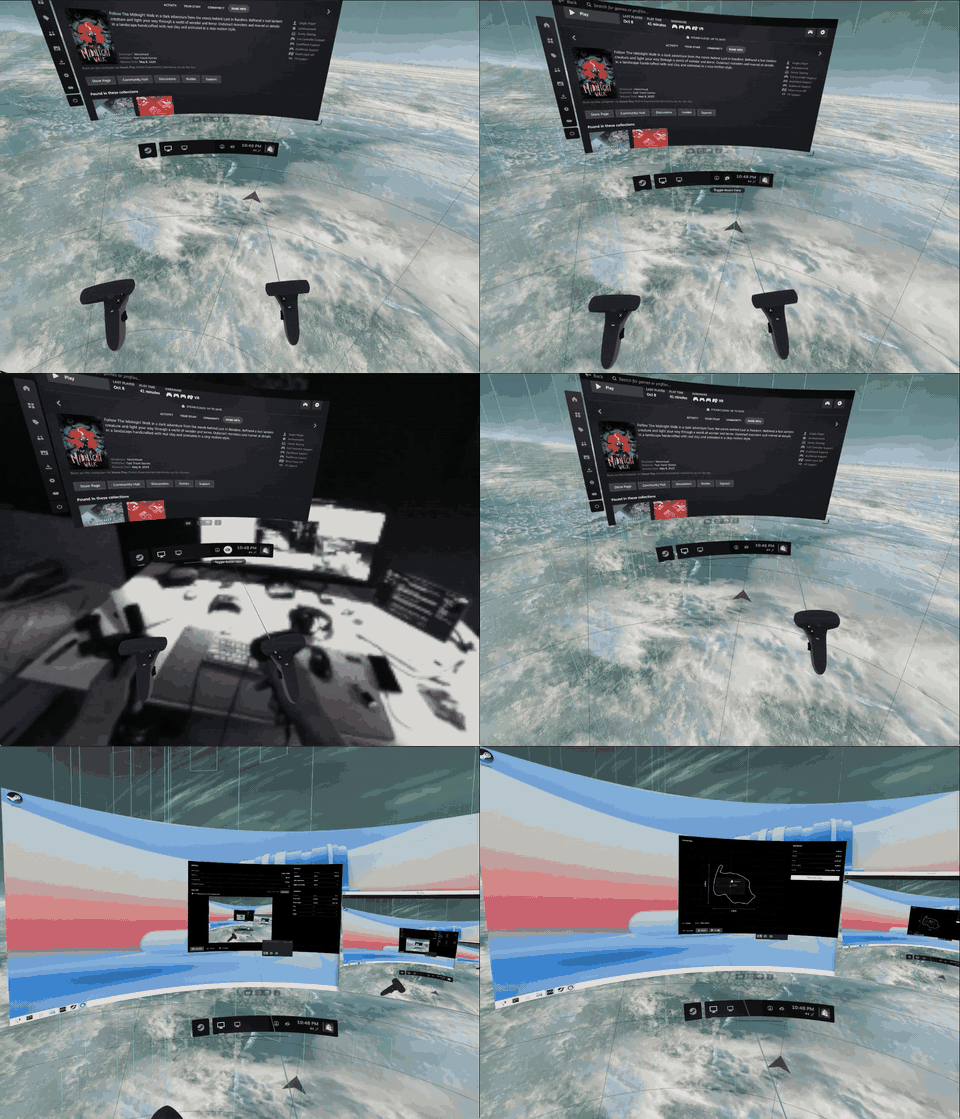
Full-quality video (19 s, MP4), recorded from SteamVR's VR View on the test machine.
Features
- In-headset Room Setup with floor calibration, a persistent boundary and saved-room recognition.
- A stable dashboard and a held position with IMU rotation when headset tracking is lost.
- Headset and both Touch controller tracking, with controller haptics.
- Rift S Settings for device state, software IPD, recentering and Room Setup, with an 80 fps zero-copy headset preview and fullscreen. The preview drops to 1 fps in standby.
- An in-headset Desktop overlay with mouse, scrolling and keyboard input on KDE Plasma Wayland.
Requirements
- Oculus Rift S, its Touch controllers, USB 3 and DisplayPort.
- An x86-64 Linux desktop with a systemd user session and local USB seat access.
- Native Steam with SteamVR installed from the Steam library.
- A Vulkan-capable GPU and drivers supported by SteamVR's direct display mode. Current testing uses an NVIDIA RTX 3090.
- The patched Basalt build. The Arch packages include it; an unpatched Basalt lacks the required reconnect support.
- KDE Plasma Wayland for the Desktop overlay.
Install
Close SteamVR and Settings before installing or upgrading.
On Arch Linux and derivatives, install the prebuilt package from the latest release:
curl -LO https://github.com/lbgos/rift-s-linux/releases/download/r28/rift-s-linux-bin-28-1-x86_64.pkg.tar.zst
sudo pacman -U rift-s-linux-bin-28-1-x86_64.pkg.tar.zst
To build the latest main instead, run makepkg -si in packaging/aur/basalt-monado-rifts, then in packaging/aur/rift-s-linux-git. AUR submission is pending. Other distributions build from source.
Build from source
Install a C/C++ toolchain, CMake, Ninja, Eigen, TBB, fmt, OpenCV, Vulkan headers and loader, glslang, libusb, SDL2, cJSON, libcap, systemd and the X11, Wayland and DRM development libraries. The Desktop overlay also needs PipeWire development files, wayland-scanner, wayland-protocols and plasma-wayland-protocols. Settings needs Rust/Cargo, Node.js, pnpm, GTK3, WebKitGTK 4.1, shaderc's glslc and desktop-file-utils.
Build Basalt at the supported revision, applying all three patches in order:
git clone https://github.com/lbgos/rift-s-linux.git
git clone https://gitlab.freedesktop.org/mateosss/basalt.git
cd basalt
git checkout df6e970c8da7636eb401a09e3317fbeaaf829b9a
git submodule update --init --recursive
for patchfile in ../rift-s-linux/patches/basalt/*.patch; do
  patch -p1 < "$patchfile"
done
cmake -S . -B build -G Ninja \
  -DCMAKE_BUILD_TYPE=Release -DCMAKE_INSTALL_PREFIX=/usr/local \
  -DCMAKE_INSTALL_LIBDIR=lib -DBUILD_TESTS=OFF -DBUILD_TESTING=OFF \
  -DBASALT_INSTANTIATIONS_DOUBLE=OFF -DBASALT_BUILTIN_EIGEN=OFF \
  -DEIGEN_ROOT=/usr/include/eigen3 -DBASALT_BUILD_SHARED_LIBRARY_ONLY=ON \
  -DBASALT_ENABLE_ROSBAG2=OFF -DBASALT_BUILD_VISUALIZATION=OFF \
  -DCXX_MARCH=x86-64 -DCMAKE_POLICY_VERSION_MINIMUM=3.5
cmake --build build --parallel 1
sudo cmake --install build
cd ../rift-s-linux
Build and install the driver in Bash:
driver_options=()
while read -r option; do driver_options+=("-D${option}=OFF"); done < <(
  sed -n 's/.*(\(XRT_BUILD_DRIVER_[A-Z0-9_]*\) .*/\1/p' CMakeLists.txt)
cmake -S . -B build -G Ninja \
  -DCMAKE_BUILD_TYPE=Release -DCMAKE_INSTALL_PREFIX=/usr/local \
  -DCMAKE_INSTALL_LIBDIR=lib -DBUILD_TESTING=ON -DXRT_BUILD_SAMPLES=OFF \
  "${driver_options[@]}" -DXRT_BUILD_DRIVER_RIFT_S=ON -DXRT_BUILD_DRIVER_SIMULATED=ON \
  -DXRT_FEATURE_STEAMVR_PLUGIN=ON -DXRT_FEATURE_SLAM=ON \
  -DXRT_HAVE_SYSTEM_CJSON=ON -DXRT_HAVE_GST=OFF -DXRT_HAVE_BLUETOOTH=OFF \
  -DXRT_HAVE_DBUS=OFF -DXRT_HAVE_HIDAPI=OFF -DXRT_HAVE_JPEG=OFF -DXRT_HAVE_LIBBSD=OFF \
  -DXRT_HAVE_LIBUVC=OFF -DXRT_HAVE_OPENVR=OFF -DXRT_MODULE_MERCURY_HANDTRACKING=OFF
cmake --build build --parallel 2
ctest --test-dir build --output-on-failure
sudo cmake --install build
sudo tee /etc/udev/rules.d/70-monado-rifts.rules >/dev/null <<'EOF'
SUBSYSTEM=="usb", ATTRS{idVendor}=="2833", TAG+="uaccess"
KERNEL=="hidraw*", ATTRS{idVendor}=="2833", TAG+="uaccess"
EOF
sudo udevadm control --reload-rules
The install registers the SteamVR driver automatically through a systemd user service, including when SteamVR is installed later or in another library. The same service sets SteamVR's launch option to vrmonitor.sh %command%, because Steam otherwise starts SteamVR in the Steam Linux Runtime container, where the driver is not visible. If SteamVR already has custom launch options, they are left alone and the service logs the command to add. It also installs the Room Setup layer, session guard and Desktop overlay. Check that CMake enables rifts-desktop; it skips the overlay if its dependencies are missing. SteamVR loads the driver in-process, so no separate monado-service needs to run.
Build and install Settings:
cd settings-app
pnpm install --frozen-lockfile
pnpm tauri build --no-bundle -- --locked
./install.sh
First run
- Connect USB and DisplayPort. Reconnect the headset after installation to apply USB access rules.
- Open Steam and click SteamVR in the library. If Steam was running during the install, restart Steam once first.
- Put on the headset and complete Room Setup. Set the floor and draw the boundary for your physical play area.
- On later starts, look around the saved room to recognize it. Check the floor and boundary before playing.
- Open Rift S Settings from the desktop launcher. For the full-resolution preview, enable its next-start preference and relaunch SteamVR once. On KDE, the native VR View opens minimized to supply the preview.
- Open the dashboard's Desktop tab to use the KDE desktop inside the headset.
Known issues
- USB or DisplayPort loss can crash SteamVR's compositor. Reconnect the headset and relaunch SteamVR manually. Recovery does not launch SteamVR automatically.
- Room recognition can remain pending, producing a "Guardian not found" notification. Uncover the cameras and look around; verify the boundary before playing.
- The Desktop overlay is supported on KWin only for now. Other desktops' portal capture and input are unverified and may require a picker on the monitor.
- Opening or resizing SteamVR's native VR View has triggered NVIDIA Xid 13 and compositor watchdog failures. Settings uses a Vulkan preview path; its full-resolution source still depends on VR View.
- Haptics use the native motor frequency; requested-frequency synthesis is not implemented.
Credits and license
This is a fork of thaytan's Monado controller-tracking branch. Thanks to Monado and Basalt upstream and their contributors. The upstream README is README-monado.md.
Monado, the driver and Desktop overlay use the Boost Software License 1.0. Rift S Settings uses MIT. Third-party files retain their own licenses in LICENSES and their source directories. OpenVR SDK headers use Valve's published BSD license.
This is an independent project, not affiliated with Meta or Valve.